
Uncategorized
LiFePO4 Battery Inverter Compatibility: Complete Guide for Installers & Distributors
Jun
1. Why Inverter Compatibility Is the #1 Field Failure Point {#why-compatibility-matters}
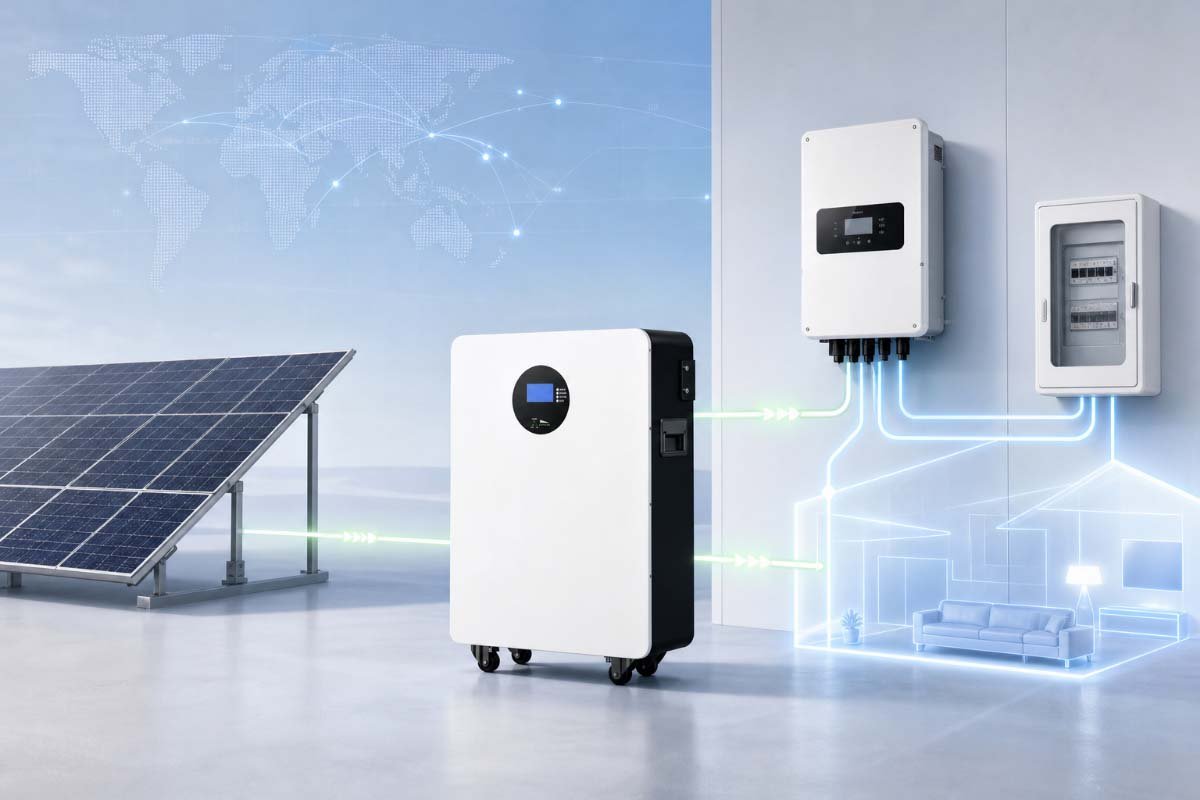
A LiFePO4 battery and an inverter can both be individually flawless and still fail together. LiFePO4 battery inverter compatibility is not about voltage matching alone — it is about whether the battery’s BMS and the inverter’s firmware can establish a stable communication handshake, exchange real-time operating data, and agree on charge/discharge control commands.
When this handshake fails silently — the most common scenario — the inverter reverts to voltage-only control, the BMS receives no charge commands, and the system operates with no cell-level protection. End customers experience symptoms ranging from unexplained alarms and reduced capacity to premature battery degradation.
For B2B distributors and installers, this creates direct business risk: warranty claims, return shipments, and reputation damage that is entirely avoidable with proper pre-deployment compatibility verification.
This page is your single reference for LiFePO4 battery compatibility with all major inverter brands — protocol requirements, verified settings, wiring specifications, and known firmware exceptions.
2. How Battery–Inverter Communication Works {#how-communication-works}
Every modern hybrid or off-grid inverter supports one of two operating modes with an external battery:
Mode 1: Voltage-Only (No Communication)
The inverter treats the battery as a dumb voltage source. It reads terminal voltage and infers state of charge from a pre-programmed voltage curve. No BMS data is exchanged.
Limitations: No SOC accuracy, no cell-level protection, no coordinated charge control. Works but wastes the intelligence built into the BMS. Acceptable for simple setups; not recommended for long-term installations.
Mode 2: Closed-Loop Communication (Recommended)
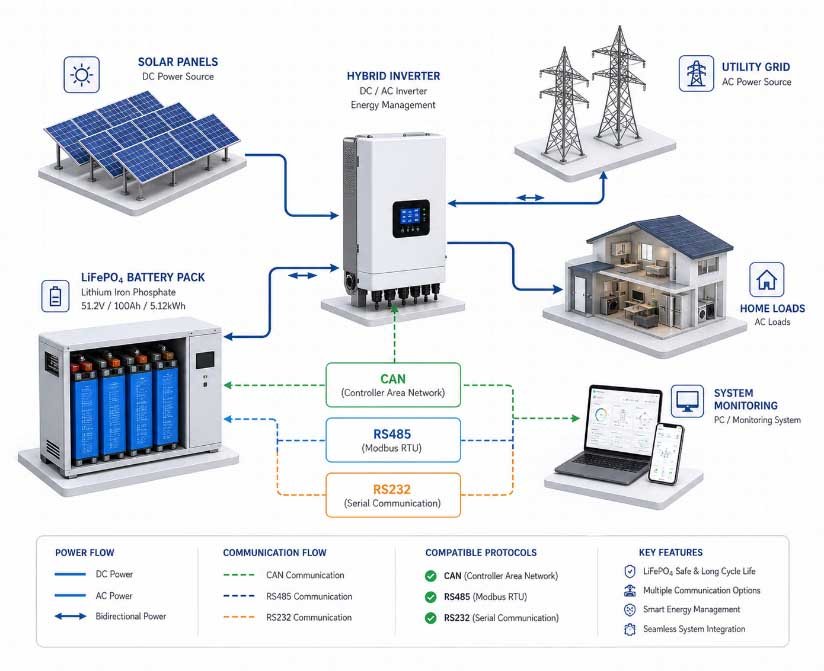
The battery BMS sends real-time data to the inverter over a physical communication cable. The inverter receives cell voltage, state of charge, temperature, and charge/discharge limits, and uses this data to control its behavior accordingly.
Benefits: Accurate SOC display, cell-over-voltage protection enforced at inverter level, coordinated charge current limiting, extended battery lifespan.
The communication link has two layers that must both match:
- Physical layer: Which port type connects them (RS485, CAN bus, RS232)
- Protocol layer: Which data language they speak over that port (Pylontech, SMA, BYD CAN, PACE, Growatt proprietary, etc.)
A physical RS485 cable between a battery and an inverter does nothing if the protocol is mismatched.
3. Protocol Types: CAN Bus vs RS485 vs No-Comms {#protocol-types}
| Protocol | Physical Port | Typical Speed | Key Brands Using It |
|---|---|---|---|
| Pylontech RS485 | RJ45 / RS485 | 9600–115200 baud | Growatt, Deye, Solis, Sofar, SolaX, LuxPower, GoodWe, Sol-Ark |
| CAN Bus (250kbps) | RJ45 / DB9 | 250 kbps | Victron, SMA, BYD-compatible inverters |
| SMA CAN | RJ45 | 500 kbps | SMA Sunny Island, SMA Sunny Boy Storage |
| Growatt proprietary | RS485 | 9600 baud | Growatt SPF/SPH legacy models |
| Modbus RTU | RS485 | Configurable | Industrial inverters, some Solis |
| No communication | — | — | Any inverter (voltage-only fallback) |
The Pylontech Protocol Standard
Pylontech’s RS485 communication protocol has become the de facto industry standard for third-party battery integration. This happened not because of any formal standardization body, but because Pylontech was the dominant home storage battery brand globally during 2018–2023, and every inverter manufacturer implemented Pylontech compatibility to remain market-relevant.
The practical result: any LiFePO4 battery that supports “Pylontech protocol” via RS485 is compatible with the vast majority of hybrid inverters on the market. Safecloud Battery’s 48V LiFePO4 systems implement full Pylontech RS485 protocol support, enabling compatibility with all major inverter brands listed in this guide.
4. Master Compatibility Matrix {#compatibility-matrix}
The following matrix covers Safecloud Battery 48V / 51.2V LiFePO4 systems paired with the listed inverter brands. Check the protocol column against your specific inverter model’s manual.
| Inverter Brand | Communication Port | Protocol | BMS Setting on Inverter | Compatibility | Notes |
|---|---|---|---|---|---|
| Growatt SPH / MAC | RS485 RJ45 | Pylontech RS485 | BMS Type: PYLON | ✅ Verified | See Growatt detailed guide → |
| Growatt SPF | RS485 RJ45 | Pylontech RS485 | Battery Type: LiIon → User Def | ✅ Verified | Firmware ≥ TL2.1 required |
| Deye / Sunsynk | RS485 RJ45 | Pylontech RS485 | BMS Type: PYLON | ✅ Verified | Enable “Battery Wakeup” function |
| Victron MultiPlus II | VE.Can | CAN 500kbps | Battery Monitor: Lynx Smart BMS / custom | ✅ Verified | Requires DVCC enabled in VenusOS |
| Victron Quattro | VE.Can | CAN 500kbps | Same as MultiPlus II | ✅ Verified | |
| Solis RHI / S6 | RS485 | Pylontech RS485 | BMS Protocol: Pylontech | ✅ Verified | |
| Sofar HYD | RS485 | Pylontech RS485 | Battery Type: PYLON | ✅ Verified | |
| SolaX X1/X3 Hybrid | RS485 | Pylontech RS485 | Battery Type: PYLON | ✅ Verified | X3-PRO preferred |
| LuxPower LXP | RS485 | Pylontech RS485 | Battery Brand: PYLON | ✅ Verified | Popular in South Africa / Australia |
| GoodWe ET/EH | RS485 | Pylontech RS485 | EMS Mode: General | ✅ Verified | |
| Sol-Ark 12K / 15K | RS485 / CAN | Pylontech / CAN | Battery Type: Lithium | ✅ Verified | [North American market primary] |
| SMA Sunny Island | CAN | SMA CAN 500kbps | Battery System: External BMS | ✅ Verified | Requires specific SMA CAN termination |
| GivEnergy | RS485 | Proprietary | — | ⚠️ Limited | Closed ecosystem; contact us to verify |
| Fox ESS | RS485 | Proprietary | — | ⚠️ Limited | Closed ecosystem; firmware-dependent |
| Huawei SUN2000 | RS485 | Proprietary | — | ⚠️ Restricted | Designed for LUNA2000 battery only |
Legend: ✅ Verified = tested and confirmed in field deployments | ⚠️ Limited = works with specific firmware versions or configurations; contact us for confirmation
5. Brand-by-Brand Quick Reference {#brand-reference}
Growatt
Market: Global #1 hybrid inverter by volume. Most common pairing in Europe, Africa, Southeast Asia, Latin America. Protocol: Pylontech RS485 on all SPH / MAC / MID-series hybrid models (2020 onwards). Key setting: BMS Type = PYLON (or “Lithium BMS” depending on firmware). → Full Growatt compatibility guide with model-by-model settings
Deye / Sunsynk
Market: Rapidly growing global presence; dominant in South Africa, UK, Australia. Protocol: Pylontech RS485 (RJ45 port on battery side, same cable as Growatt). Key setting: BMS Type = PYLON. Enable “Battery Wakeup” in advanced settings for systems that enter standby. Note: Deye and Sunsynk are the same hardware; Sunsynk is the European/African brand name. → Deye detailed guide — coming soon
Victron Energy
Market: Premium off-grid and marine segment, dominant in Europe, Australia, boat/RV. Protocol: VE.Can (proprietary CAN bus). Does not use Pylontech RS485. Key setting: Enable DVCC (Distributed Voltage and Current Control) in VenusOS (Cerbo GX / Venus GX). Set “Battery Monitor” to the connected BMS device. Cable: VE.Can RJ45 to CAN RJ45 — pin-out critical, use verified cable. → Victron detailed guide — coming soon
Solis
Market: Strong in Europe (UK, Netherlands, Germany) and Australia. Protocol: Pylontech RS485 via dedicated “BMS” port on inverter. Key setting: BMS Communication = Enable; Battery Type = PYLON.
Sofar Solar
Market: Europe, Middle East, Africa. Protocol: Pylontech RS485. Key setting: Battery Type = PYLON (HYD series) or Battery Mode = AC Coupling (some models).
Sol-Ark
Market: North America (United States primary). Protocol: Both RS485 (Pylontech) and CAN bus supported. Key setting: Battery Type = Lithium; BMS = ON; Communication = RS485 or CAN per cable used. Note: Sol-Ark 15K is the most common pairing for US residential solar storage.
SMA
Market: Germany and premium European market. Protocol: CAN bus at 500kbps (different from Victron’s implementation). Key setting: Battery System = External Battery Management; CAN termination resistor (120Ω) required at both ends. Note: SMA Sunny Island specifically. SMA grid-tied inverters (Sunny Boy) do not support external battery BMS.
6. How to Verify Compatibility Before You Order {#verify-before-order}
Use this three-step verification process before placing any LiFePO4 battery order for a specific inverter deployment:
Step 1: Identify your inverter’s communication port and protocol
Check the inverter’s installation manual. Look for:
- A port labeled “BMS,” “Battery COM,” “RS485,” or “CAN”
- The manual’s battery compatibility section (usually titled “External Battery” or “Third-Party Battery”)
- The specific BMS Type or Battery Type options in the inverter settings menu
Step 2: Confirm protocol match with battery BMS
Your LiFePO4 battery’s BMS must support the exact protocol the inverter expects. “RS485 support” is not sufficient — the protocol spoken over RS485 must match. Safecloud Battery BMS firmware supports:
- Pylontech RS485 (standard and extended versions)
- CAN bus 250kbps and 500kbps
- Modbus RTU (on request for industrial applications)
- Voltage-only (no communication, always works as fallback)
Step 3: Verify firmware versions
Inverter firmware updates frequently add or change battery compatibility. Before deployment, confirm:
- The inverter’s installed firmware version supports the expected BMS protocol
- The battery BMS firmware version is current (request the latest version from your supplier)
- Known firmware incompatibilities for your specific inverter model (check this page and our FAQ)
Shortcut: Send us your inverter model and firmware version. Our engineering team will confirm compatibility and provide the exact cable specification and settings values. → Request compatibility confirmation | april@safecloudenergy.com

7. Safecloud Battery Protocol Support {#safecloud-support}
All Safecloud Battery 48V / 51.2V LiFePO4 systems ship with the following communication capabilities:
| Feature | Specification |
|---|---|
| RS485 port | Standard RJ45, Pylontech protocol (9600–115200 baud, auto-negotiate) |
| CAN bus port | RJ45, 250kbps and 500kbps selectable |
| Supported protocols | Pylontech RS485, CAN 250k, CAN 500k, Modbus RTU (configurable) |
| Parallel communication | Up to 15 units in RS485 daisy-chain; master/slave auto-assign |
| BMS firmware updates | Field-updatable via USB; free firmware updates for product lifetime |
| Inverter compatibility matrix | Maintained and updated quarterly; available on request |
Communication cable supply: Safecloud provides verified, pre-tested communication cables for all major inverter brands listed in this guide. Specifying your inverter brand when ordering ensures you receive the correct cable — eliminating the most common installation failure point.
8. Frequently Asked Questions {#faq}
Q: My inverter shows “Battery Communication Fault” after connecting. What should I check first?
A: In order of likelihood: (1) Verify the BMS Type / Battery Type setting in the inverter menu matches the protocol your battery supports — the most common cause. (2) Check cable pin-out — RS485 A/B polarity reversal causes silent failure. (3) Confirm communication baud rate matches (default 9600 for most Pylontech RS485). (4) For multi-battery parallel systems, verify only the master unit’s communication port is connected to the inverter. (5) Power-cycle both battery and inverter after changing settings.
Q: Can I use a LiFePO4 battery with an inverter without any communication cable?
A: Yes. Without a communication cable, the system operates in voltage-only mode. The inverter infers SOC from terminal voltage and applies fixed charge/discharge voltage limits. This works but is suboptimal: SOC accuracy is poor (±15% typical), and the battery’s BMS over-discharge protection is the last line of defense rather than the inverter coordinating with the BMS. For permanent residential installations, closed-loop communication is strongly recommended.
Q: Does the Pylontech protocol work between different battery brands?
A: Yes. “Pylontech protocol” refers to a communication standard, not a brand-exclusive technology. Any battery manufacturer can implement Pylontech RS485 protocol in their BMS firmware. Inverters set to “PYLON” BMS type will communicate with any battery that correctly implements the standard — including Safecloud Battery systems.
Q: My inverter brand isn’t listed in your matrix. Can your batteries still work with it?
A: Likely yes, either via Pylontech RS485 (if the inverter supports it) or voltage-only mode (as a fallback). Contact our engineering team with your inverter make, model, and firmware version. We will test and confirm compatibility within 3 business days.
Q: Do you provide communication cables with your batteries?
A: Yes. Specify your inverter brand when placing an order and we include the correct pre-tested communication cable. For multi-brand deployments, we can supply cables for each inverter brand in your project.
Q: What is the maximum number of Safecloud batteries that can be connected in parallel?
A: Up to 15 units per RS485 bus (master + 14 slaves). For larger systems requiring more units, contact our team for configuration guidance. Parallel communication is automatically handled by the BMS master/slave auto-assignment.
Related Pages:
- Growatt Inverter Compatibility — Detailed Guide →
- LiFePO4 Battery vs Lead-Acid Battery: 2026 B2B Guide →
- How to Choose a LiFePO4 Battery Manufacturer in China →
Safecloud Energy — Grade A LiFePO4 Battery Manufacturer Since 2007 +86-13242407897 | info@safecloudbattery.com
